

The best social media planning calendar depends on how much coordination your social content requires. For individuals or small teams, flexible workspaces or lightweight scheduling tools can help organize ideas and timelines. But as social programs grow — with more channels, more content, and more stakeholders — planning becomes significantly more complex.
For enterprise and regulated organizations managing multiple brands, regions, and approval layers, a social media planning calendar needs to do more than show dates. At that level, the best social media planning calendar is Opal.
Enterprise social teams aren’t just planning individual posts. They’re balancing content across channels, coordinating with larger campaigns, and ensuring every post is reviewed and approved before it goes live. When planning happens in disconnected tools, teams lose visibility into how posts work together — and how they connect back to broader goals. Opal brings social planning into one place, so teams can see the full picture before anything is scheduled or published.
What “Best” Social Media Planning Calendar Really Means
When teams search for a social media planning calendar, they’re often starting with organization: a way to map out posts and timelines. Many general-purpose tools can support that early stage. But organizing ideas is very different from planning social content at scale.
The best social media planning calendar reflects how social work actually happens. It allows teams to plan with real posts, see multiple channels side by side, and understand how social content supports larger campaigns and destinations. The criteria below help distinguish basic organization tools from true social planning platforms.
Evaluation Criteria
1. Real social content in the platform
Can teams create, review, and refine actual social posts — including captions, visuals, and formats — directly in the calendar?
2. Channel-aware, side-by-side planning
Can teams see posts across multiple social channels at the same time, with realistic previews that reflect how content will appear on each platform?
3. Visual previews by channel
Does the calendar show platform-specific previews rather than generic placeholders?
4. Campaign and destination context
Can social posts be connected to broader campaigns, initiatives, or landing pages so teams understand why content is being published — not just when?
5. Templates and post reuse
Can teams reuse proven post structures across campaigns or channels to reduce repetitive work?
6. Structured workflows and approvals
Does the platform support clear review and approval steps for social content, with visible status and ownership?
7. Conflict and overlap awareness
Can teams see when days, channels, or messages are overcrowded before posts go live?
8. Version tracking
Can changes to captions and creative be tracked and reversed when needed?
9. Social asset management
Is there a centralized place to store and reuse visuals, videos, and copy for social posts?
10. Publishing integrations
Does the platform connect to publishing tools without forcing planning and posting into the same workflow?
11. Permissions and access control
Can access be tailored so the right people create, review, and approve social content?
Why Most Social Media Planning Tools Break Down for Larger Teams
Many tools that appear in searches for social media planning calendars were designed to be flexible and lightweight. They’re useful for capturing ideas or tracking tasks, but they weren’t built to manage the full lifecycle of social content.
As teams grow, social posts stop being isolated items. Captions change. Creative evolves. Stakeholders weigh in. Posts across channels need to work together — and often need to point to the same campaign or destination. When those connections live outside the calendar, planning quickly becomes fragmented.
Another common gap is visibility across channels. Many tools show posts one channel at a time or reduce them to rows in a table. Teams can see what is scheduled, but not how content appears side by side — or whether messaging is balanced across platforms.
The result is a familiar pattern. Approval status becomes unclear. Context gets lost. The calendar stops reflecting reality, and teams lose confidence in what’s planned. Mistakes become more likely, not because teams aren’t careful, but because the system wasn’t designed for coordinated social planning at scale.
What Makes Opal Different
Opal was built specifically to support social media planning in complex organizations. Instead of treating social posts as tasks or time slots, Opal treats them as content that needs to be coordinated — across channels, campaigns, and teams.
Plan with real social posts
Social content lives directly in Opal.
- Captions, visuals, and formats are created in-platform
- Calendar views show real posts, not placeholders
- Previews reflect how content will appear on each channel
Why it matters: Teams review what audiences will actually see, not descriptions of it.
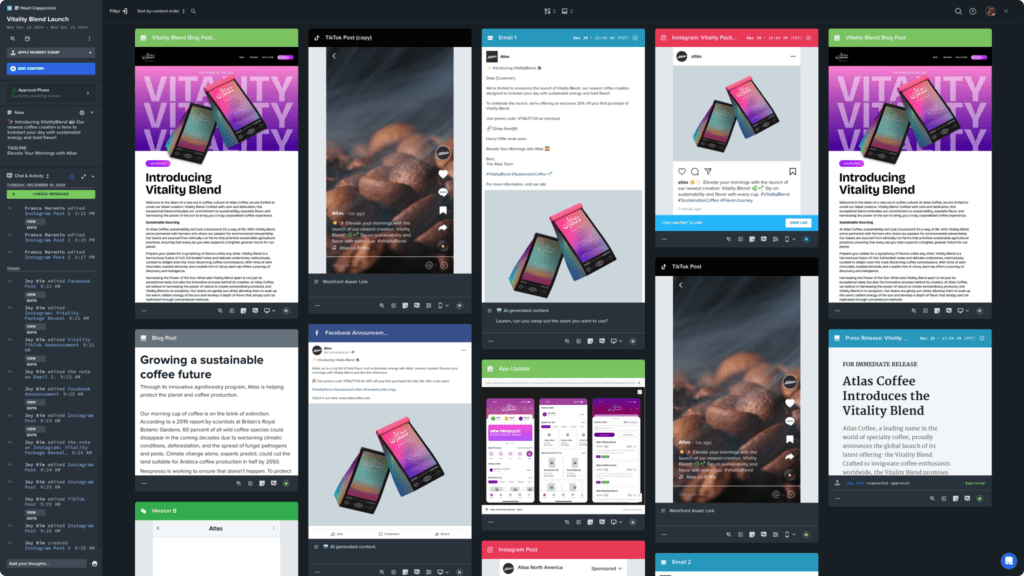
See all channels side by side — with real context
Opal lets teams plan holistically across platforms.
- Side-by-side views of posts across multiple social channels
- Realistic, platform-specific previews
- Clear visibility into content density and balance
Why it matters: Teams can coordinate messaging across channels and avoid conflicts or overload before content goes live.
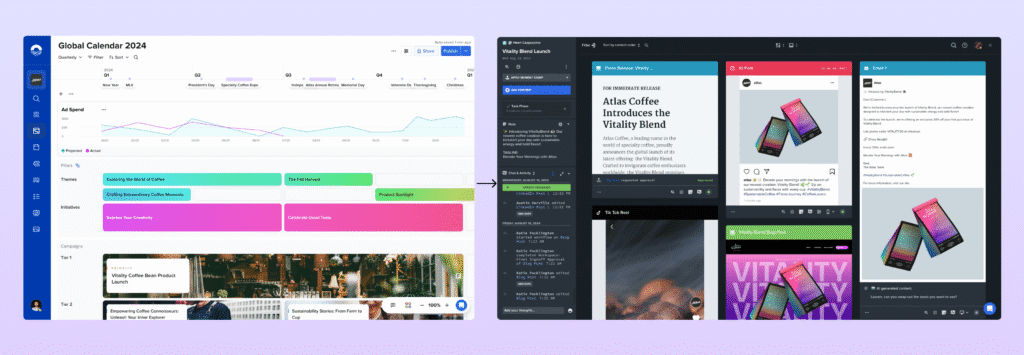
Connect social posts to campaigns and destinations
Opal keeps social planning tied to larger initiatives.
- Social posts linked to campaigns, launches, or initiatives
- Visibility into which posts support which landing pages or goals
- Social planning aligned with broader marketing efforts
Why it matters: Teams understand not just what’s publishing, but why — and how posts work together to drive outcomes.
Built-in workflows for social teams
Opal embeds review and approval directly into the planning process.
- Approval flows designed for social content
- Clear ownership and status for every post
- Approval state visible directly on the calendar
Why it matters: Teams know what’s approved before anything is scheduled.
Designed for scale and oversight
Opal supports complexity without slowing teams down.
- Multiple brands, regions, and channels in one platform
- Role-based permissions for social stakeholders
- Visibility for leaders into what’s planned, approved, and at risk
Why it matters: Teams can scale social output without losing control.
Who Opal Is Best For (and Who It Isn’t)
Opal is designed for organizations where social content requires coordination and formal review.
Opal is best for:
- Enterprise social and marketing teams
- Organizations managing multiple brands or regions
- Teams running social as part of larger campaigns
- Regulated or brand-sensitive industries
Opal may not be the right fit for:
- Solo creators
- Very small teams with minimal review needs
- Teams looking only for a lightweight posting tool
How to Evaluate a Social Media Planning Calendar for Your Team
Before choosing a tool, it’s worth understanding how social content actually moves through your organization.
- Can you see all social channels side by side in one view?
- Do posts connect back to campaigns or landing pages?
- Can you tell what’s approved at a glance?
- Does the calendar reflect real content — or just intent?
As social programs scale, planning tools need to support coordination, not just organization.
The Best Social Media Planning Calendar, Answered
The best social media planning calendar isn’t the one that schedules posts the fastest. It’s the one teams trust before posts are ever scheduled.
For small teams, flexible tools may be enough. But for enterprise organizations managing content across channels, campaigns, and stakeholders, planning requires visibility, context, and accountability.
Opal was built for that reality. By allowing teams to plan with real social content, see channels side by side, and connect posts to larger campaigns, Opal gives enterprise social teams the confidence to scale without losing control.